NDX Inspections · Aviation B2B · iOS, Android, web
Jet fuel inspections that work without signal and hold up at audit
Fuel quality checks at airports are mandatory, safety-critical and audited. They used to live on paper. I led design of NDX Inspections across mobile, web and report forms, from the first prototypes.
ATA 103
the US standard for jet fuel quality
plus JIG forms for some networks
3
platforms, one product model
iOS, Android and web
2021
on NDX from the first drafts
Inspections since 2022
All
US locations of Signature Aviation, the world's largest FBO network
network-wide agreement, October 2024
Role
Lead Product Designer
Mobile, web and report forms. Two junior designers
Team
PM, CEO, engineers, QA
Product decisions: the PM, our CEO and me
Setup
Agency team for NDX
All client contact went through our CEO

The world's largest FBO network
Signature Aviation chose NDX Inspections for all its US locations
Announcement, October 2024 ↗01
Checks that an audit depends on
FBOs, the companies that fuel and handle business aircraft, must inspect refuelers, filter vessels, storage tanks and hydrant systems every day, week, month, quarter and year. When a reading is out of range, the equipment goes out of service and comes back only after a separate return-to-service inspection.
Inspector
On the fuel farm, with a phone
Dozens of checklist items per inspection, often in gloves, in direct sun and without a connection.
FBO admin
On the web
Equipment, open issues, return to service and the reports that go to the audit.
Corporate manager
Across dozens of locations
Missed inspections, equipment out of service, the state of the whole network.
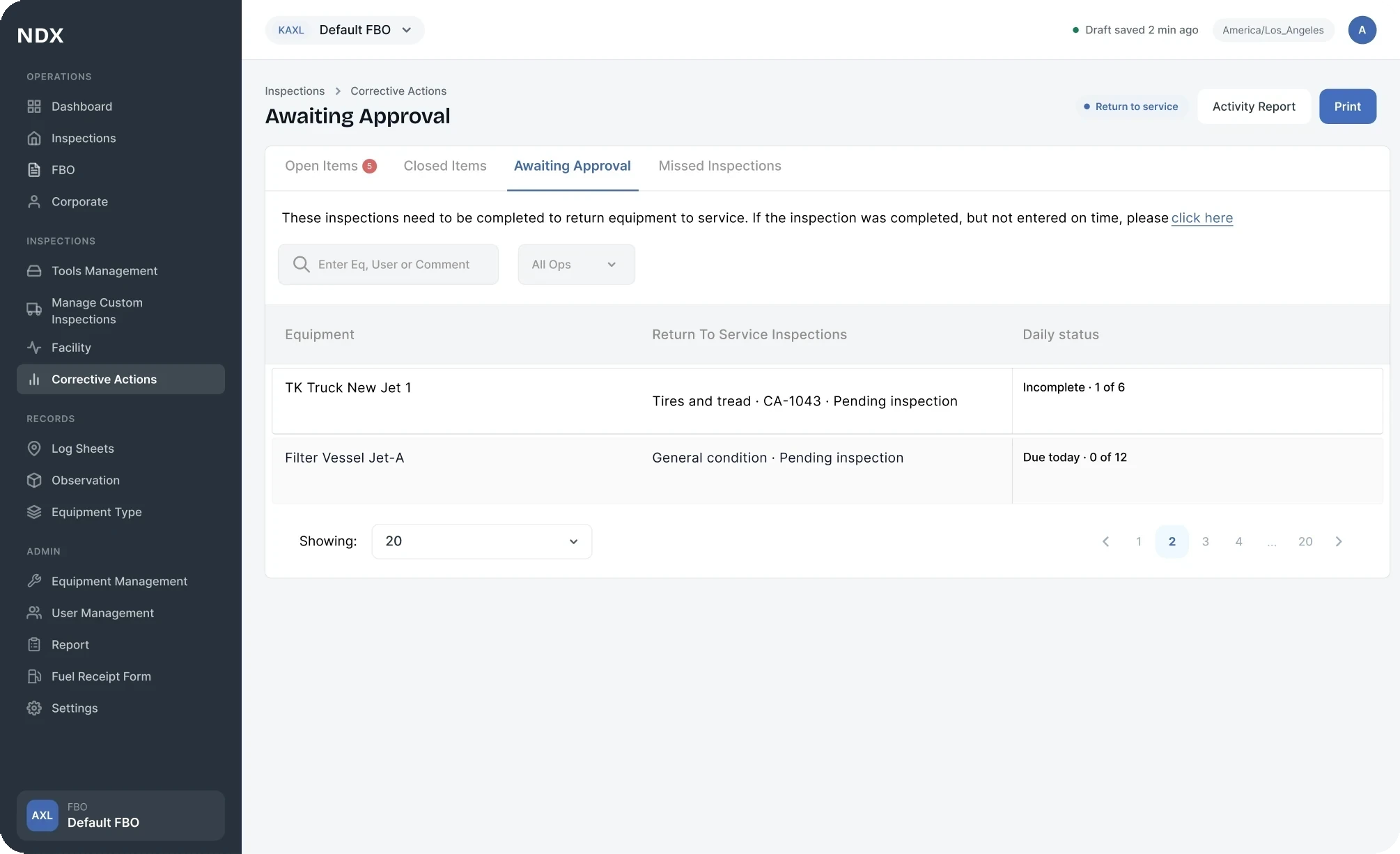
Return to service on the web: equipment stays out of use until its own inspection is done. A quick daily check does not bring it back.
The task
Business goal
A record an auditor accepts
Replace paper fuel-quality logs with a digital record that produces the right standard form at audit time.
User goal
Finish on the farm, sure it counts
The inspector completes the checklist without signal and never wonders whether it was really submitted.
Constraints
Fixed rules, no direct access
ATA 103 and JIG define the forms. Offline is normal. I worked through intermediaries, without analytics.
02
What I knew, and how I knew it
Client communication went through our agency CEO. I asked to talk to the client's team directly, but the agency rule stayed. I did not visit airports or fuel farms, and I had no product analytics access. This limited what I could validate directly with inspectors.
How the ramp reached me
7 AM on a US ramp is 5–9 PM in Kyrgyzstan
What I worked from
- The standards themselves: ATA 103 and JIG forms.
- Requirements and bug reports with screen recordings from production.
- Engineers, on what was technically possible.
- Reviewing builds against the design and the logic.
How decisions were made
Product decisions were made by three of us: the PM, our CEO and me, with the client's requests in mind. Technical options we worked through with the engineers.
What I'd change
I would now prioritize observing a complete inspection, including a failed upload, to test the assumptions that stayed open through intermediaries.
One example: from a report to a decision
Reported
Inspections stayed open for weeks on Android phones.
Hypothesis
The photo upload had failed, and the inspector had no way to see it.
Decision
A visible failure state, automatic retry and a manual resend.
Still unverified
How inspectors actually notice that notification on a fuel farm.
Hypotheses I designed from
Without field access, each decision started as a hypothesis built from bug reports and the standards. Section 09 shows how I would check each one with data.
H1 · Offline
Inspections get lost not because there is no signal, but because the inspector can't tell saved from submitted.
→ Section 03H2 · No tag
If a damaged tag blocks the inspection, it gets skipped. Allowing it with a written reason keeps the record complete and honest.
→ Section 04H3 · Photos
Photos go missing because failed uploads are invisible, not because inspectors skip them.
→ Section 05H4 · Reports
Audit problems come from the data on each line: dates, form revisions and who did what. Not from the report layout.
→ Section 0603
Designing for the fuel farm
I designed for the field constraints the client reported: gloves, glare and unreliable connectivity. The question for every screen was what still works under them.
Gloves
Less typing, not yet glove-proof
Every checklist item is answered with a fixed set of condition codes: Satisfactory, Comment, Not Applicable, Not in Service, Not Used. Typing only when there is something to describe. What I would fix: we never tested with gloves, and looking at the screens now, some controls are too small to hit reliably in gloves.
Glare
Contrast chosen for sun
Several of our clients were in Florida, so I chose contrast for statuses and readings with glare in mind. It was never checked on site.
No signal
Saved is not sent
The dangerous case isn't being offline. It's an inspector who believes an inspection was submitted when it is still only on the phone. So those states look different.
Inspection path on the phone
Scrolls sideways →
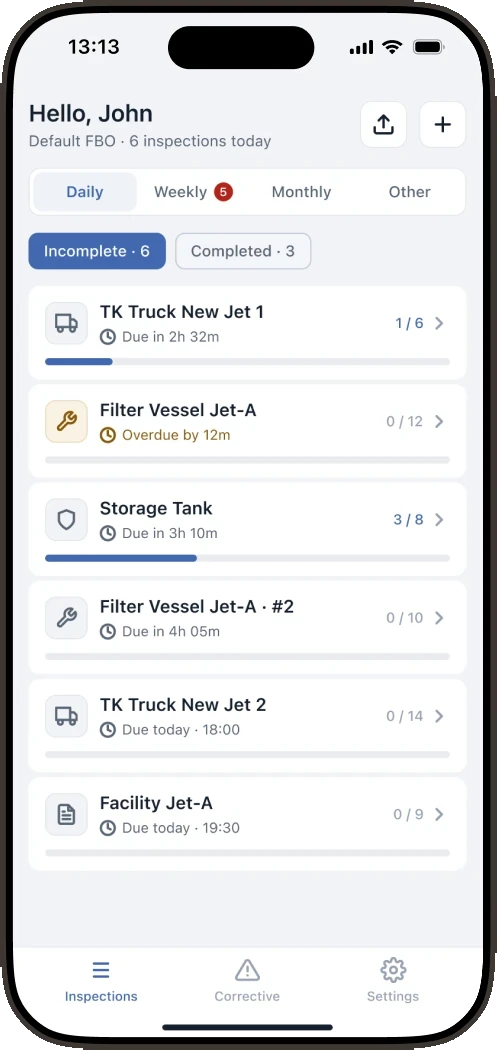
Today's inspections, with status and progress for each piece of equipment.
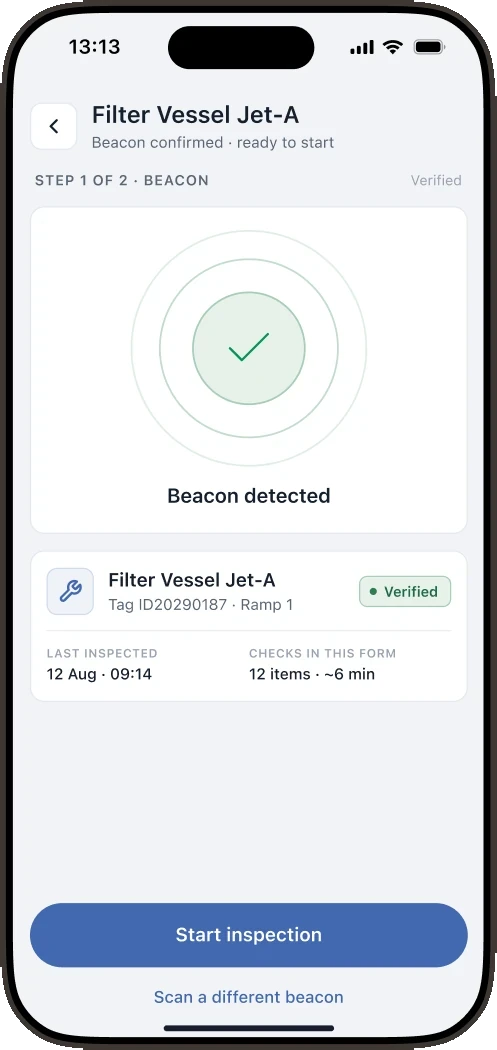
The NFC tag confirms the inspector is at this equipment.
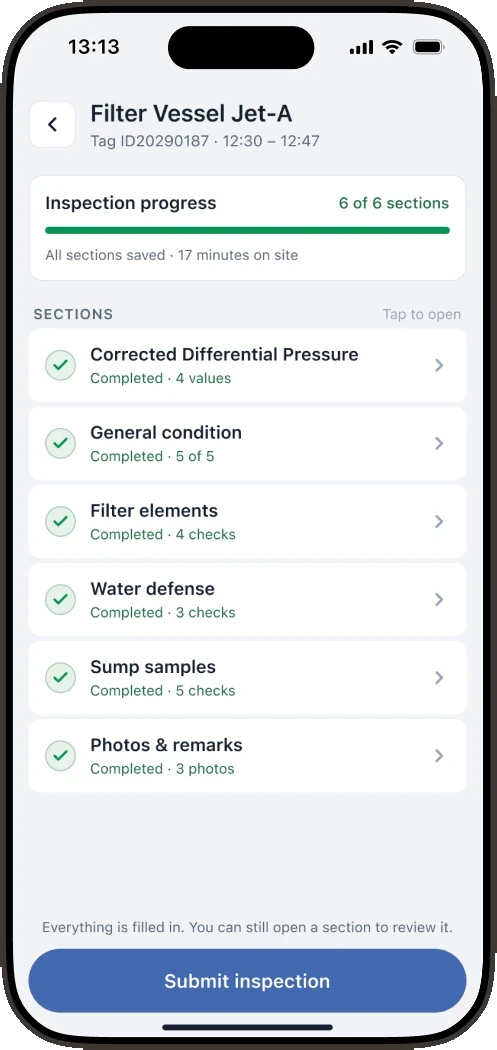
Sections filled in, ready to submit.
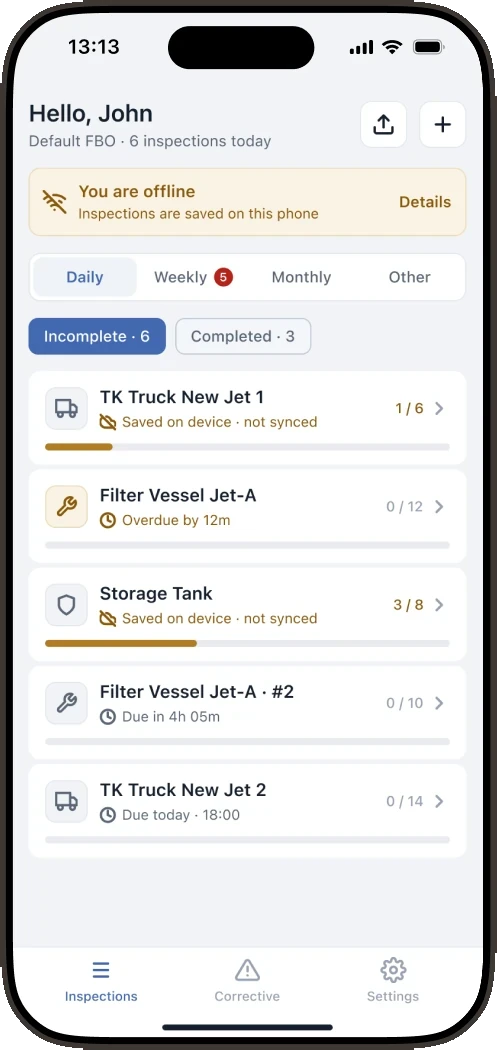
Connection lost: "saved on device, not synced" right in the row.
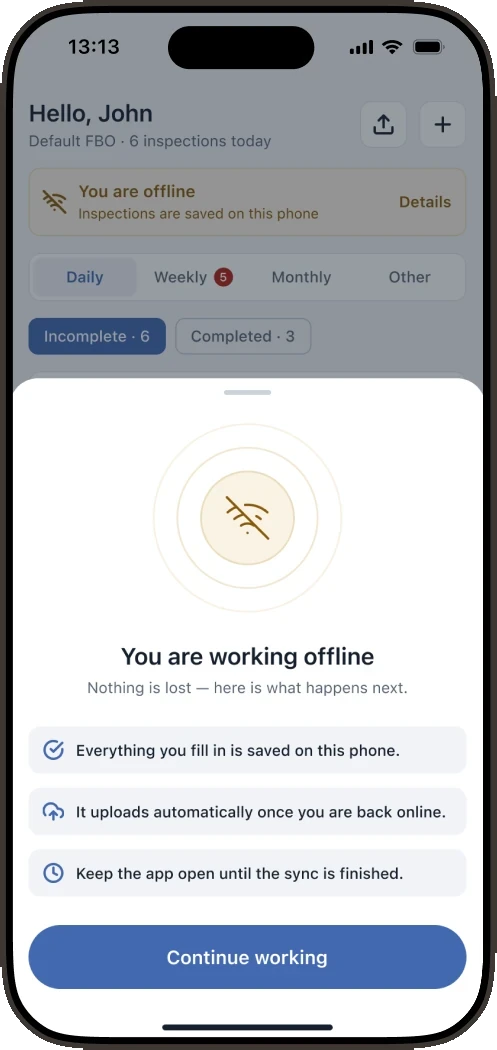
What happens to the data while offline, in plain words.
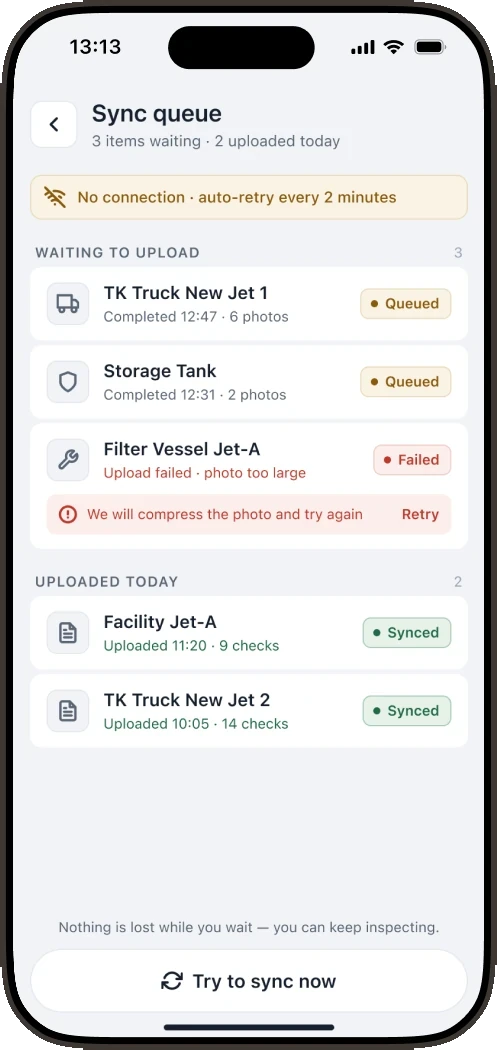
A queue with Queued, Failed and Synced. Nothing counts as sent until it is.
Data and dates on the screens are illustrative.
04
When the inspector can't scan the tag
Tags get damaged or can't be reached, and a mandatory inspection can't simply be skipped. As a team we decided to allow it, but never silently.
The path without a tag
- 01
No tag read
The phone looks for the tag. "Not physically present" is always on screen, so a damaged tag never blocks the inspection.
- 02
Reason required
A sheet asks why. Submit stays disabled until there is an explanation.
- 03
Reason in the record
The note is saved with the inspection, so the audit sees which checks had no scan.
Rebuilt from the design files for this case, in the style of the current app. The animation shows the flow; it is not a screen recording. The last screen, the saved record, is simplified.
Decision
Allowed, with a written explanation
"Not physically present" opens a required explanation. It stays in the inspection record.
Cost
One more step
In exchange, the audit sees exactly which inspections were done without confirmed presence.
What we never claimed
A tag is not quality
A scan records that the tag was read at the equipment. It doesn't show that the check was done well.
The shipped label was "Not physically present", which also covered a damaged tag. Looking back, I would word it "Continue without scanning the tag" and keep the required explanation. This is a retrospective proposal, not what shipped.
05
What went wrong: three versions of one photo rule
Some inspections, like the millipore test, need a photo as evidence. I designed the photo upload flow across three versions. The problem moved from missing evidence to inspections blocked by uploads that failed without a clear explanation.
Three versions, as a flow
Schematic of the logic, not product screens.
Version 1
Photo optional to close
Inspections closed fine. Many photos never arrived.
Version 2
Photo required to close
The inspector didn't know why the inspection stayed open.
Version 3
Make the failure visible and recoverable
The failure is visible, and there are two ways to recover.
A strict rule without visible failure feedback doesn't solve the problem. It moves it somewhere else. In the field, every upload needs a visible state and a way to recover. Now I design the failure state first.
06
The report is the product
For the FBO, inspections only matter if they come out as the right standard form at audit time: ATA 103.01A, 103.01C, 103.04A, 103.04B, 103.06 and JIG. I designed these report forms. The design had to account for completion dates, form revisions and who did each line.
Dates
When it was done, not when it was printed
Each line carries the date the check was completed. A report generated later must not rewrite history.
Revisions
One site, two versions of a form
An FBO can have equipment on the 2019 and 2023 revisions of the same form. Mixing them in one report breaks it.
Form sets
Moving between standards
When an FBO moved from ATA forms to its network's own forms, reports came out blank until the mapping between them was fixed.
People
Who did each line
If one inspector starts an inspection and another finishes it, every line has to keep its own inspector and time.
Anatomy of a report line
Schematic with illustrative data. Not the real form.
ATA 103.01A · revision 202324
| Check | Completed | Inspector | Code |
|---|---|---|---|
| Filter vessel, differential pressure | 03/12, 07:421 | J. P. | S |
| Nozzle pressure | 03/12, 07:55 | J. P. | S |
| Hose condition | 03/13, 06:10 | A. K.3 | C |
- 1The completion time of each line, not the date the report was generated.
- 2One form revision per report. Equipment on the 2019 and 2023 revisions never mixes.
- 3The inspector on each line. Here one inspector started and another finished.
- 4The form set. Moving from ATA forms to a network's own forms needs a mapping, or the report comes out blank.
07
Fifty locations, one inbox
Corporate and regional managers don't fill in inspections. They need to know where the network needs attention, without drowning in emails from every site.
The request
A client with 50+ locations wanted regional managers to choose which notifications they get, and for which sites.
Chosen
One default set for the whole region, and an override per location only where it differs. Expandable rows instead of a 50 × 14 matrix of checkboxes.
Why
Most sites follow the default. The screen should show the few exceptions, not repeat the same answer fifty times.
Region default, exceptions only
Schematic with illustrative data.
08
Concept: describe it, don't type it
An independent concept made for this application. Not part of NDX, not shipped, not tested with inspectors. It continues a thread from NDX, where I cut typing with one-tap condition codes: what if the inspector didn't have to type at all?
Concept · not shipped
The inspector holds one button and describes the finding. AI drafts the checklist item, the condition code, the reading and a short comment. The inspector confirms.
- 01
Hold and describe
One large button at the bottom of the screen. The words appear as they are heard, so a misheard word is visible right away.
- 02
A draft, not a record
AI fills in the item, the condition code, the reading and a comment. Every AI value is marked and can be edited or discarded.
- 03
Numbers come back as numbers
42 PSI is over the 40 PSI limit for this check, so the number gets its own confirmation. It is never accepted silently.
- 04
The inspector confirms
Only a confirmed value becomes part of the inspection. If the hose already has a similar open issue, the inspector decides whether this one is new.
Concept screens built for this case, in the style of the NDX app. Illustrative data. The animation shows the intended flow; nothing here was built or tested.
Offline
Audio is kept on the phone while offline and processed when the connection returns. The item shows "waiting to process"; nothing becomes part of the record until it is confirmed.
Noise and accents
Speech recognition will mishear some words next to running engines and fuel trucks. The transcript stays visible, and typing into a field is always one tap away.
What I would test first
On a real fuel farm, with inspectors: how often AI picks the wrong checklist item, how often a number is misheard, and whether confirming a draft is actually faster than typing.
09
Outcome, and what I can't claim
For the product
NDX Inspections replaced paper logs for FBO networks across the US. Signature Aviation selected it for its US network in October 2024; at the time of the announcement about a third of its US locations used it.
Announcement ↗What I can't claim
That is the product's and the team's result, not a measured effect of my design. I had no access to analytics, so this case has no uplift numbers.
What I'd do next time
Agree on these events with engineering before launch, so every design decision ships with a way to check it.
If I had the data: how I would check each decision
At the agency, designers had no access to product analytics, and nobody tracked the effect of design changes. So instead of numbers, here is how I would test each decision with data the product already records: inspection date, completion date, inspector, status and sync time.
Decision
Saved vs submitted
Offline states that separate the two.
I would check
Time from completing an inspection to its sync, and inspections still on the phone after 24 hours.
Because it shows
Whether inspectors notice data that never left the phone.
Decision
No-tag path
Continue without a scan, with a reason.
I would check
Share of inspections without a scan, by location, by equipment and by inspector.
Because it shows
A spike on one tank means a broken tag. A spike on one inspector means a habit to talk about.
Decision
Photo rule, version 3
Visible failure, retry, resend.
I would check
Time from a failed upload to a successful one, and photos that never arrive.
Because it shows
Whether the failure state is seen and acted on, or ignored.
Decision
Regional defaults
Notification preferences for 50+ locations.
I would check
Share of locations that override the regional defaults.
Because it shows
If most locations override them, the defaults are wrong.
10
Who did what
Me
Mobile and web design, report forms, offline and failure states, design reviews of builds. Set and reviewed tasks for two junior designers.
PM and our CEO
Product decisions together with me. Our CEO owned the relationship with the client. The recurring corrective actions logic was not my decision.
Engineering and QA
Sync and upload logic, report generation, NFC, releases to the App Store and Google Play.
11
Takeaways
Didn't work
- Changing the photo rule twice before making upload failures visible and recoverable.
- Learning about the field through intermediaries. It made every question slower.
Taking forward
- Design failure states first: no signal, failed upload, damaged tag.
- Treat a report as more than an export: dates, revisions and authors.
- Never let "saved" look like "sent".
Next
- A working prototype of the voice capture concept.
- NDX Ground Ops: from beacons on aircraft to a walk-around with a phone.