Ground operations that teams can verify
On the ramp, a single operation passes between the field crew and the manager: the work happens on a phone, while the status and the history are needed on the web. Without explicit states, a record can look finished before the work is. In GroundOps and Inspections I separated preparation, unknown data, completion and the problems that stay open after an inspection. The cost of a missed step: damage to an aircraft, or work with faulty equipment.
Role
Product Designer · Axel
External team for NDX
Timeline
2021–2026
From the start of the project to the end of my involvement
Platforms
Web · iOS · Android
Phone and tablet
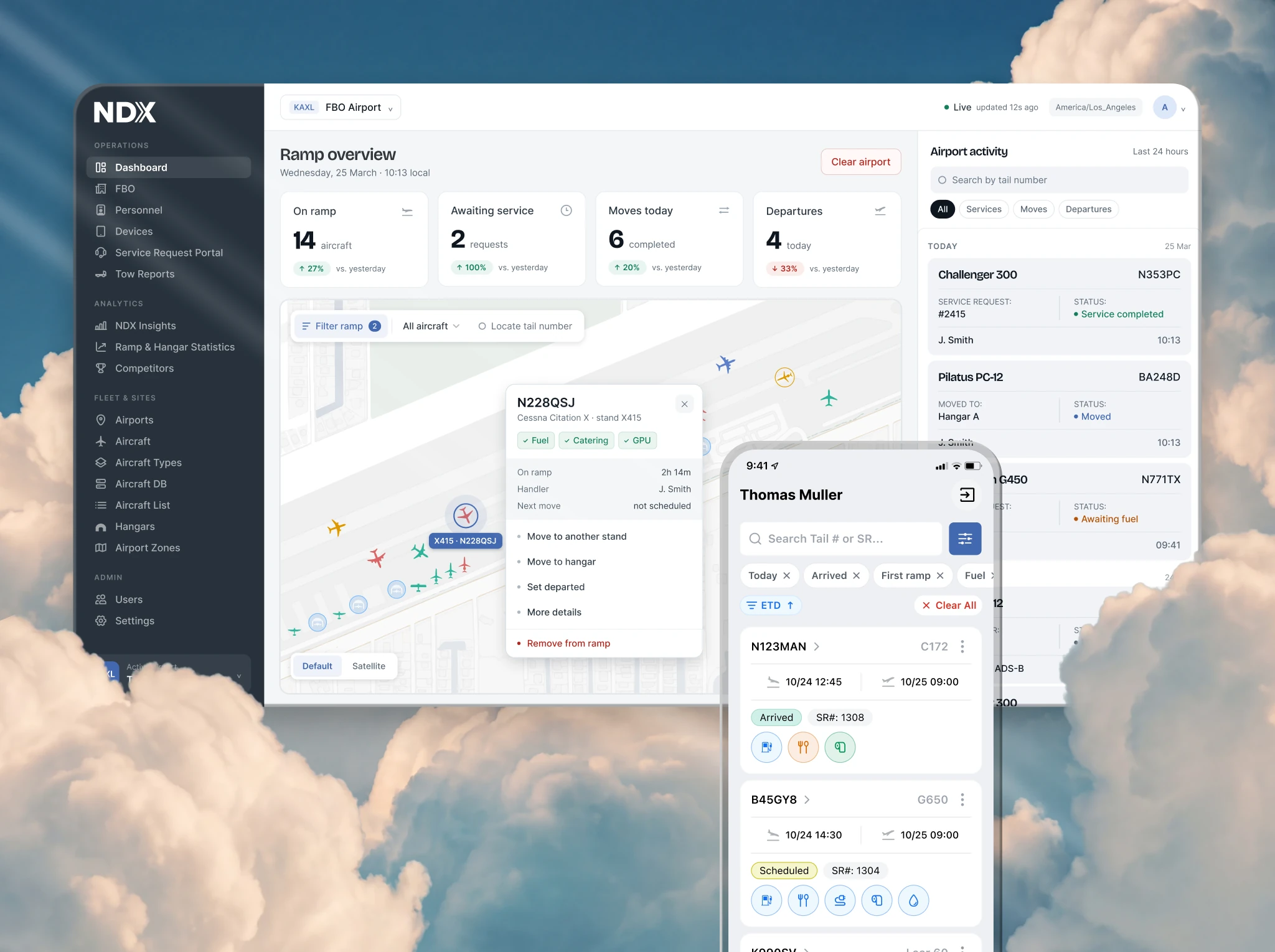
GroundOps + Inspections
Two products for business aviation ground teams
1/3
of Signature's US locations were working with Inspections
As of the announcement in October 2024. Signature selected the product for a network-wide rollout across the US. A result of the whole team.
Read the announcement ↗2 decisions
this case is built on
- GroundOps: working when data is unknown.
- Inspections: inspection finished, problem still open.
01
A field test changed the direction
Collision Prevention was part of the early Ramp, the future GroundOps. Beacons on the extremities of the aircraft were meant to send the distance to an obstacle to a phone. City tests looked convincing, but on an active ramp the signal proved unreliable. The product team and the engineers stopped the hardware direction.
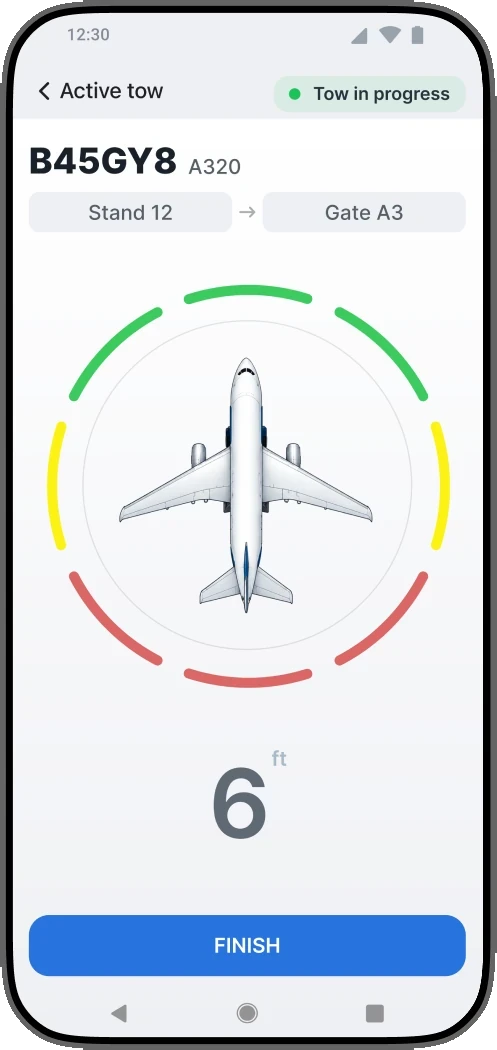
Early concept, 2021.
Preparing and recording a tow
In the later work on GroundOps I tied the crew's actions to the state of the operation. Phone positioning helped show the location, and people confirmed that the steps were done.
My decision
Designed the checks, the destination choice, the crew composition and the completion as parts of one tow: on the phone and on the web.
Trade-off
Confirmations cost the employee time. They record the steps that were completed, but they do not replace a distance sensor.
I treated the technology's feasibility as already proven
The team worked on the hardware hypothesis for about six months. I started detailed design work before the technology was tested on an active ramp. The reliability and stop criteria should have been agreed earlier; part of the states and roles I worked out later proved useful in GroundOps.
02
A tow: from preparation to completion
The employee chooses the destination, goes through the checks and confirms the crew. The manager needs to see which tow is running and when it is finished. I connected preparation, movement and completion to one operation.
01
Choose the destination
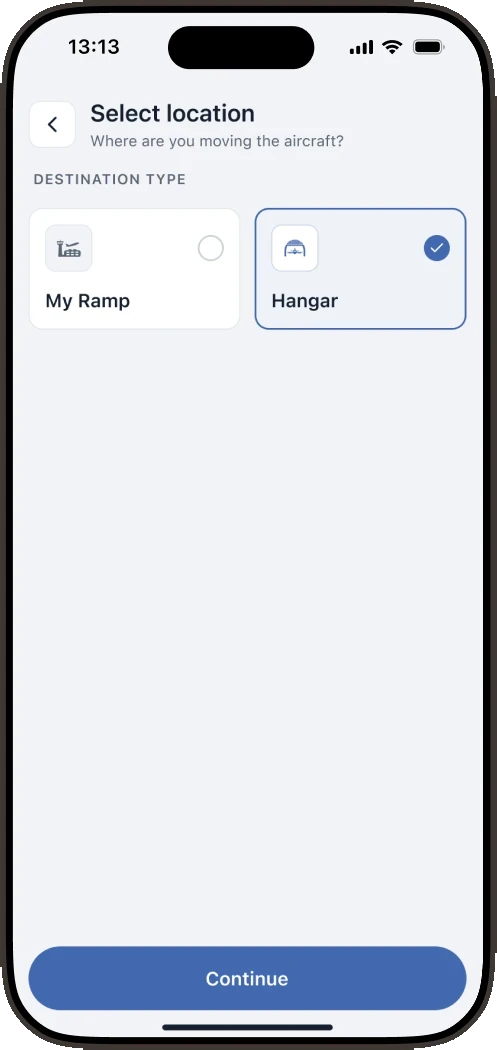
Destination.
02
Check the aircraft
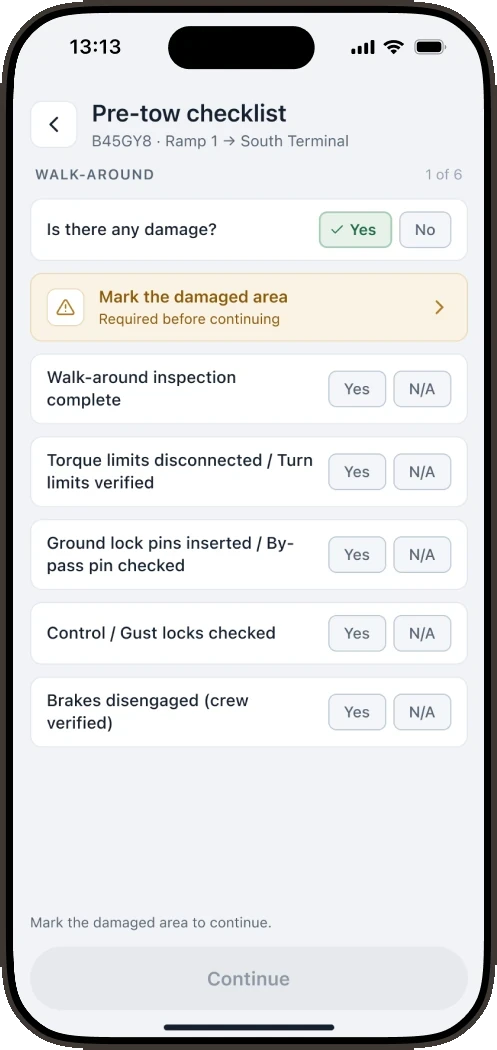
Walk-around and checks.
03
Confirm the team
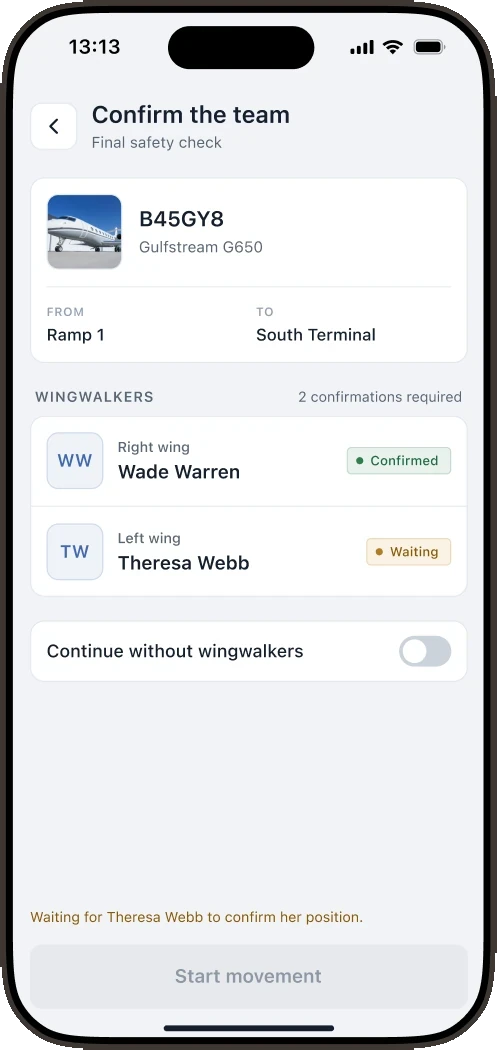
Assignment and confirmation
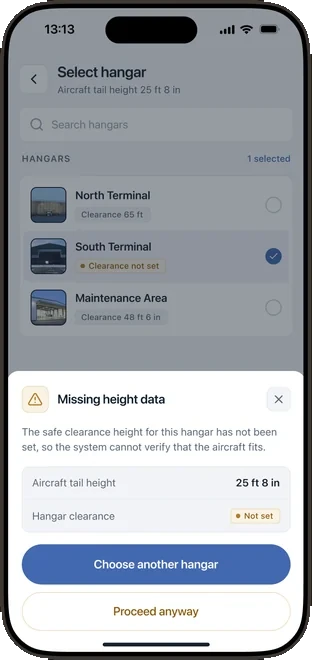
Fragment of the warning when data is missing.
Unknown height is a separate state
I separated missing data from a dangerous clearance: I put the aircraft height next to the missing hangar data and explained why the comparison is not possible.
Instead of a silent "safe" or an automatic block: a warning and an explicit choice. The cost: the crew can continue, but the system does not confirm a safe clearance and does not prevent a wrong decision.
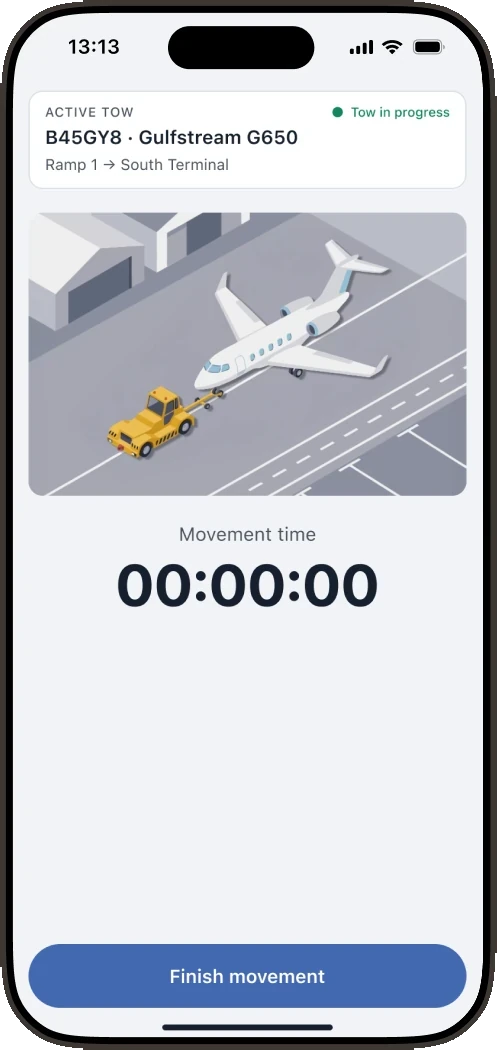
The employee confirms completion
The timer shows the duration; Finish movement explicitly ends the tow and changes its status. The cost: the employee has to take one more action, and without it the operation stays unfinished.
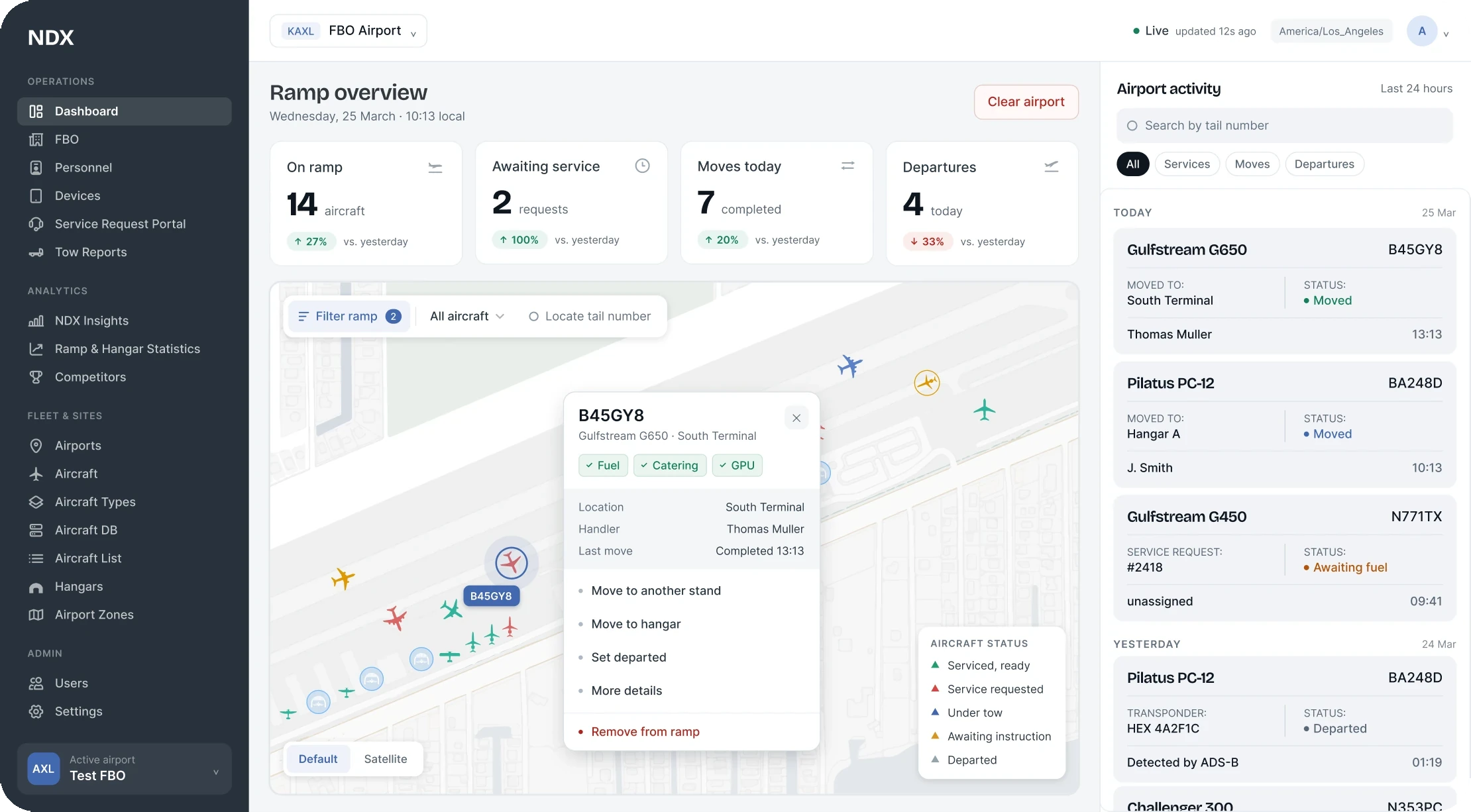
The manager needs the result of the operation
The aircraft, the route, the participants and the completion time have to belong to the same tow. That is what makes it possible to reconstruct the work from the record.
03
Inspection finished, problem still open
From 2022 I designed Inspections: fuel quality checks to the ATA 103 standard and ground equipment inspections. The main requirement for the model: finishing an inspection must not close the work on a fault that was found. I connected the inspection, the problem and the steps that follow.
01
Choose the inspection
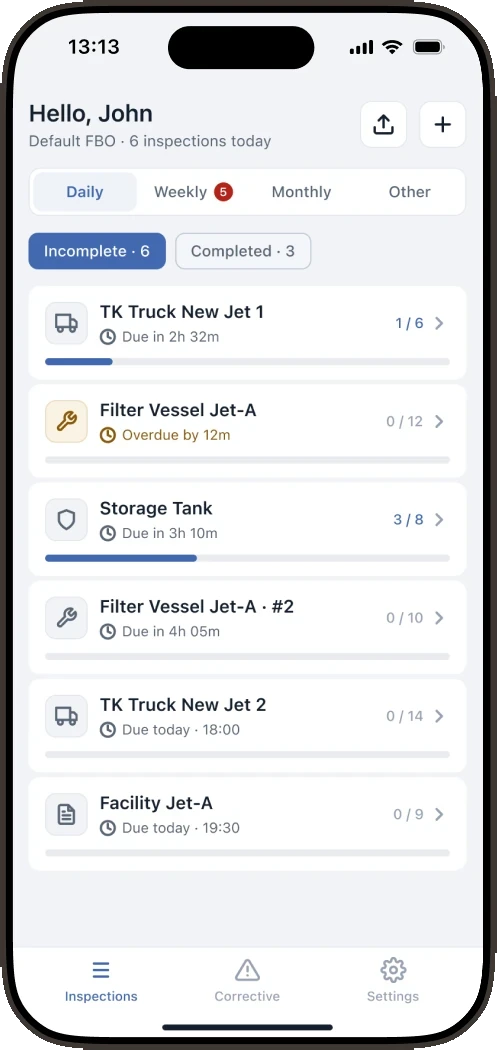
Working material: statuses and the confirmation method are already visible in the list.
02
Confirm the equipment
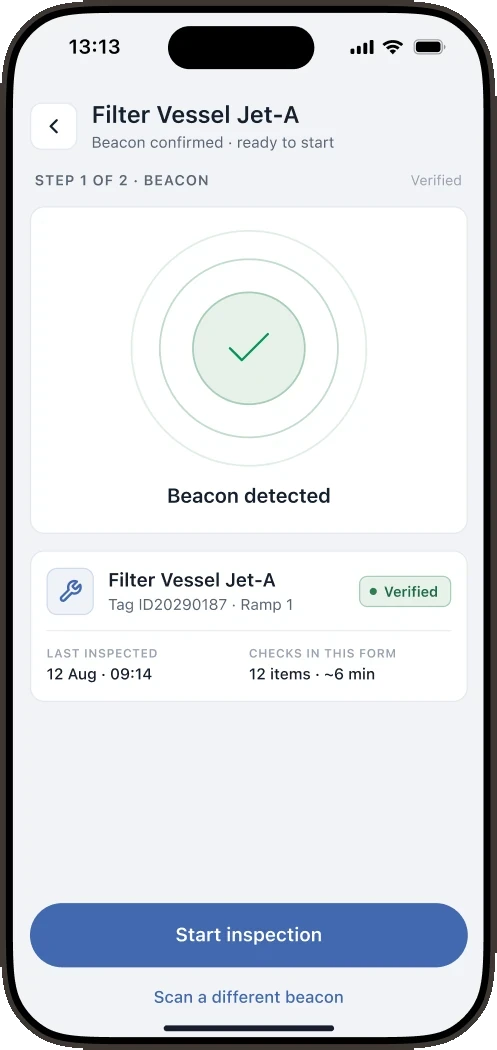
Reading the tag confirms the selected equipment. It does not prove the quality of the inspection.
03
Prepare for submission
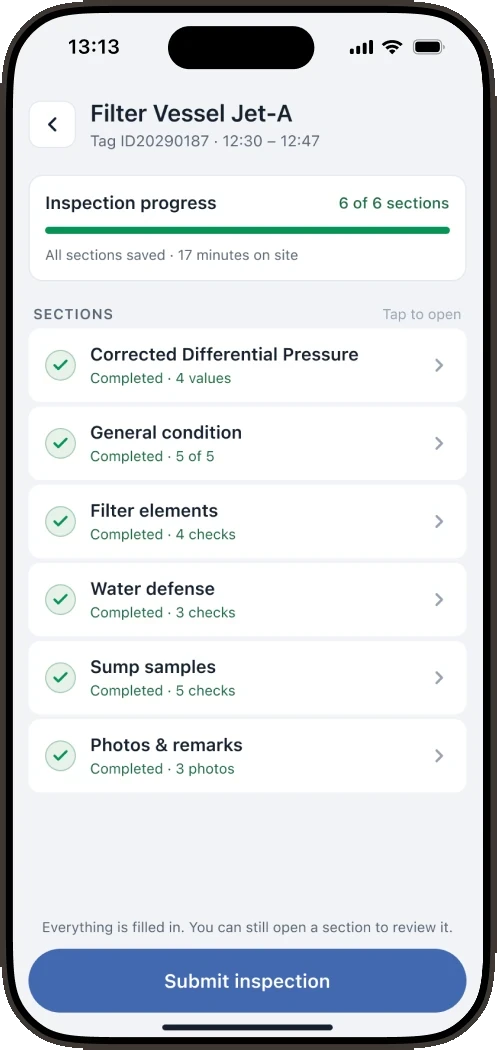
The completed sections are gathered before submission; this screen does not yet confirm that the result is saved.
Saved ≠ submitted
Inspections works without a connection. A result saved locally is not yet visible to the manager on the web; it appears there after a successful upload. These states cannot be shown the same way.
01
Connection lost
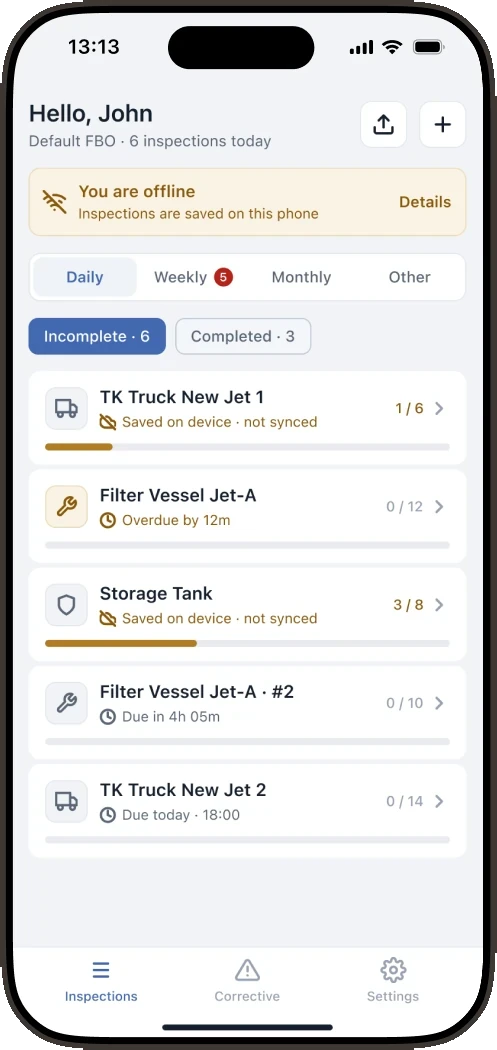
The banner reports the offline state and marks the records saved on the device only.
02
What happens to the data
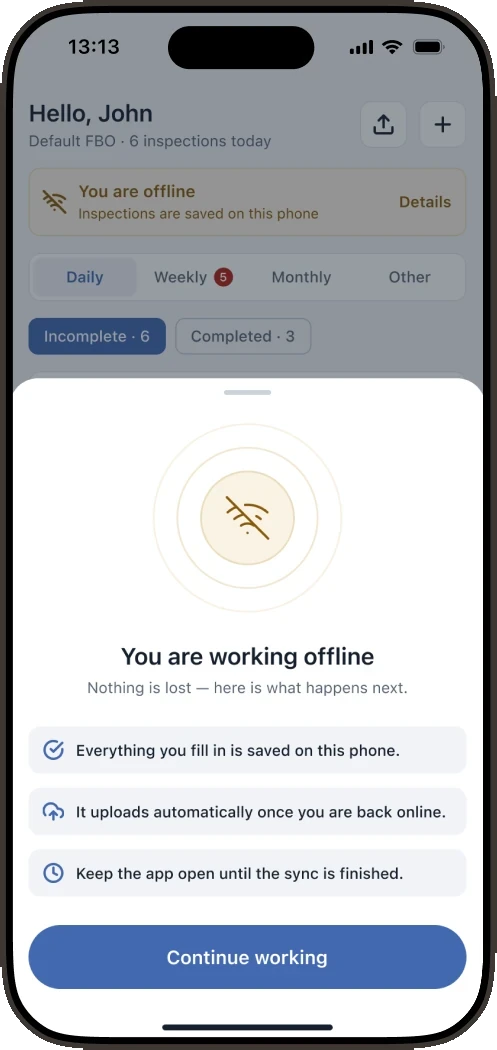
The explanation separates local saving from uploading and lets the work continue.
03
Sync queue
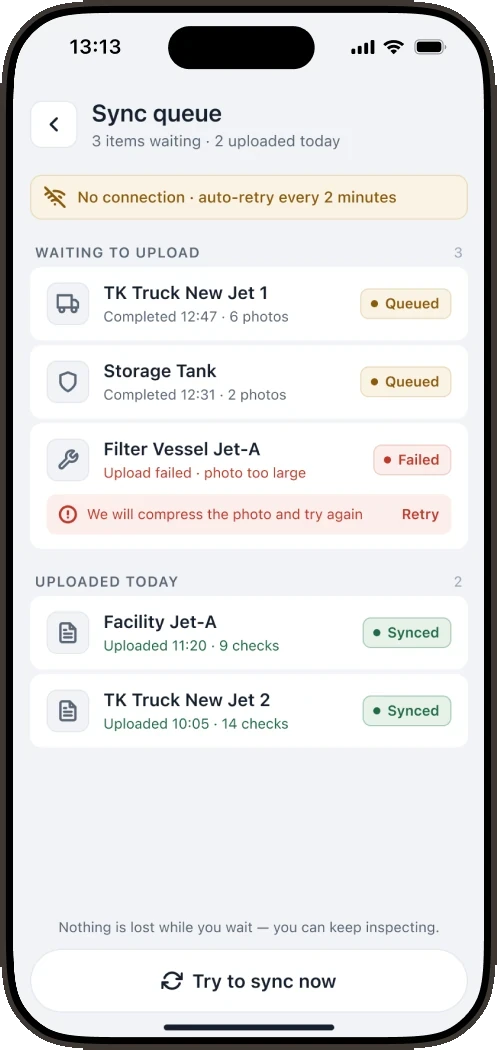
Queued, Failed and Synced show what is waiting to upload, where a retry is needed and what is already uploaded.
A record of the problem
Stays open after the inspection is finished.
Work on the fix
Description, actions and history for the same equipment.
If taken out of service
A separate inspection is required before it returns.
Continue work that is already open
On the next inspection the employee can run into the same problem. I showed the existing corrective action right inside the check: description, date, comment and files.
Continuing the inspection and working on the problem are different actions. That adds a step, but it keeps the context: finishing the form does not close the discrepancy.
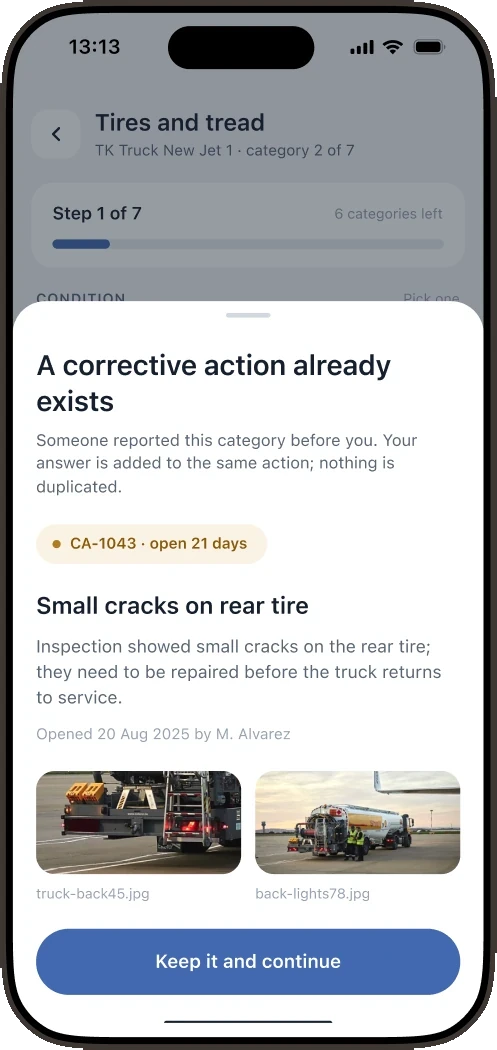
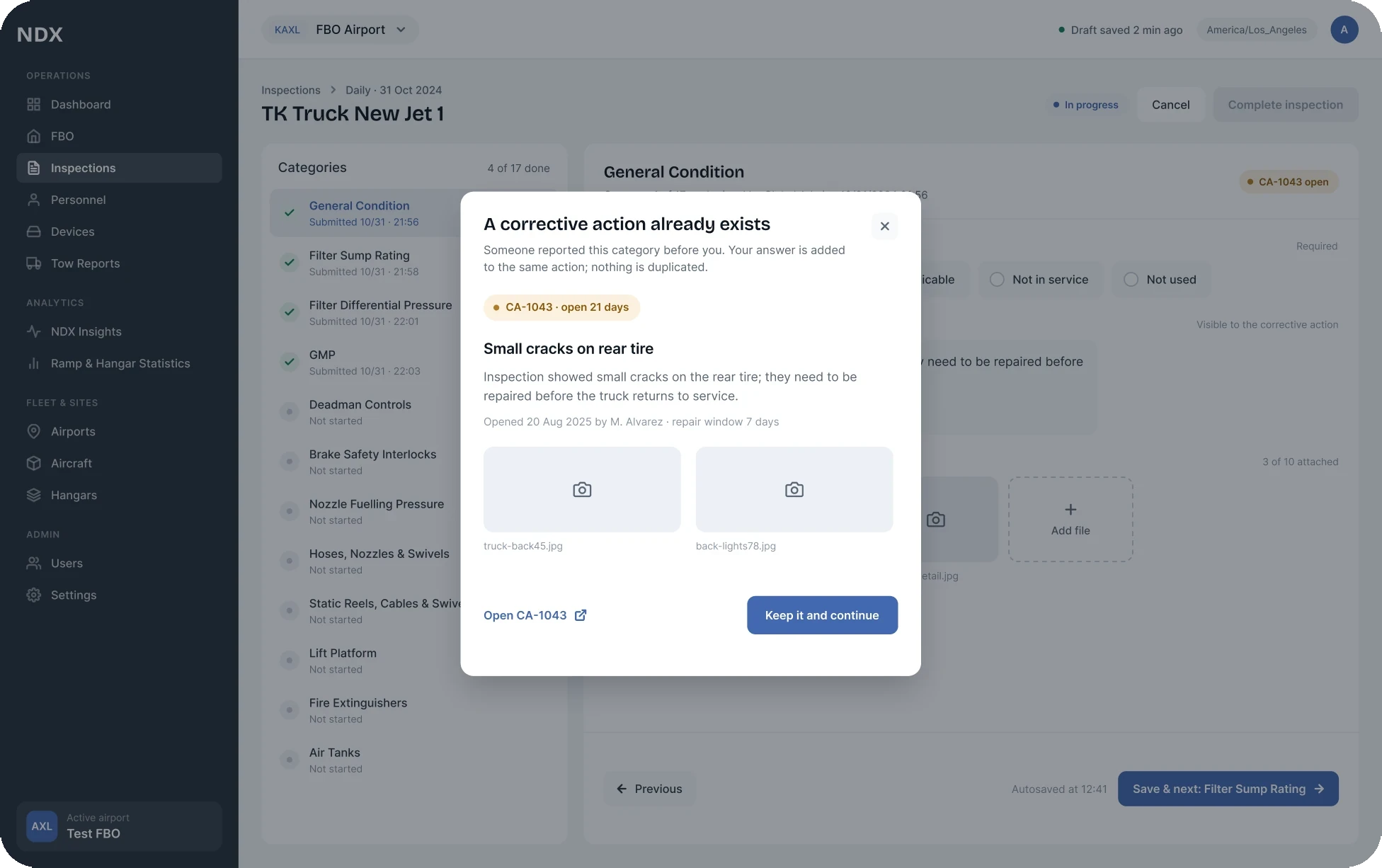
After the fix, a separate return inspection is required
On the web the equipment stays in the queue until the Return to Service inspection is finished. This is a separate step after the problem is fixed. The cost: an extra inspection; in return, the manager sees that the equipment cannot be treated as ready for work yet.
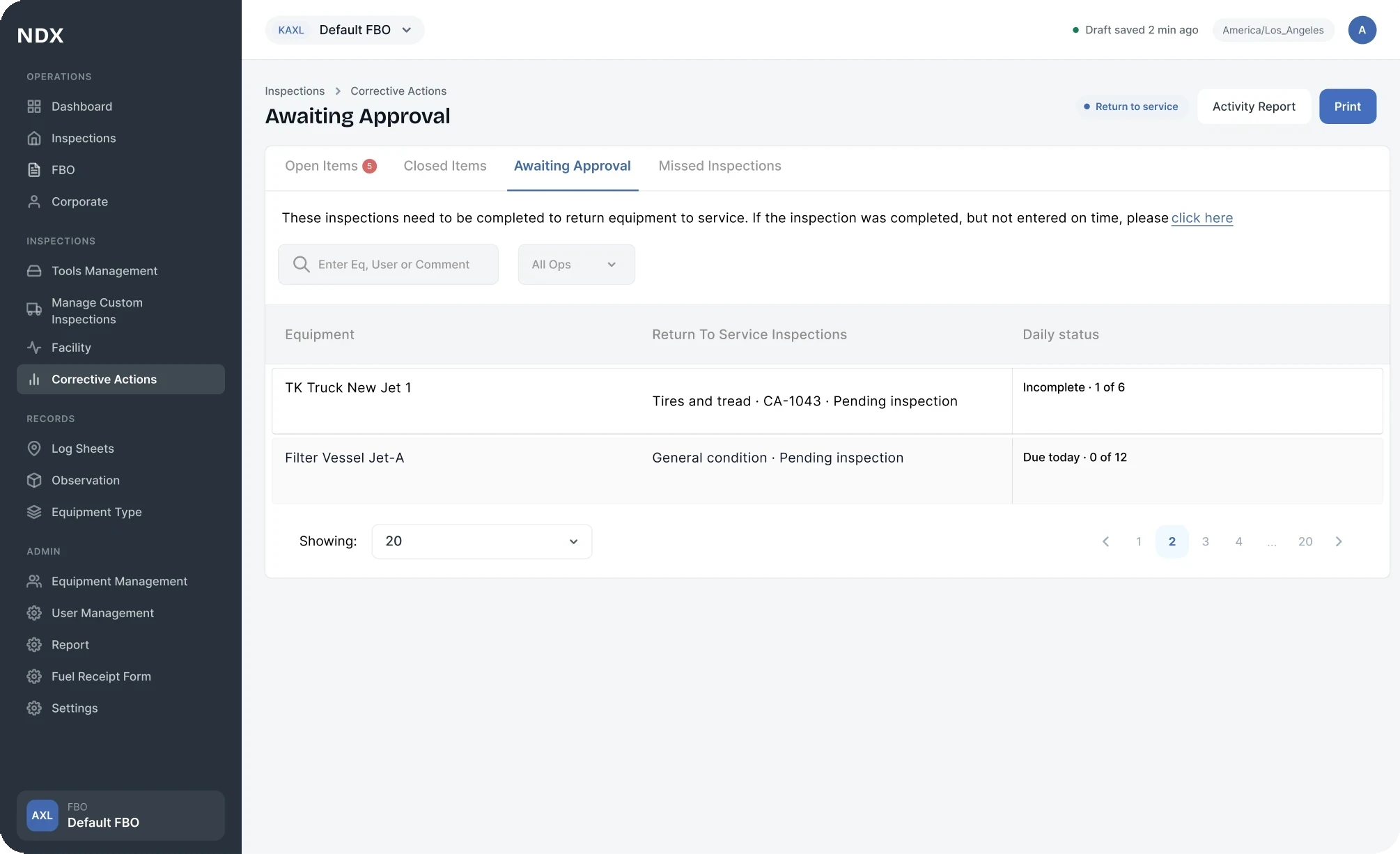
The screen is assembled from the working Awaiting Approval structure and the current navigation; the row data is anonymized.
04 · Contribution and outcome
SummaryThe early Ramp concept (the future GroundOps), the key GroundOps flows, the structure of Inspections and the link between mobile work and the web.
Shared rules for forms, tables and statuses. I reviewed other designers' work and worked through exceptions with engineers and QA.
I worked on the Axel team as an external product designer for NDX. Requirements and feedback from the sites came through the product lead; there was no constant direct access to operators. Product and engineering set the technical direction. I was responsible for the flows and the interfaces.
External confirmation of scale
Signature selected Inspections for its US network after evaluating the product. This confirms demand for the solution and is a result of the whole team; it does not measure my personal contribution alone.
Announcement ↗The NATA program
NDX acts as a technology partner for the NATA fuel quality control program: digital inspections, corrective actions and records for audit. This confirms that the model is relevant to the industry.
Program ↗Without access to operational analytics I cannot confirm fewer errors or time saved. To evaluate the decisions I would check how complete the tow records are and how long problems take to resolve, while watching the time it costs employees and the upload failures.
With operators I would test two things: whether it is clear that an unknown height does not mean a safe clearance, and whether they distinguish finishing an inspection from fixing the problem.